KOA SLIDE

Free bilingual church subtitle software

Worship slides,
made simpler.

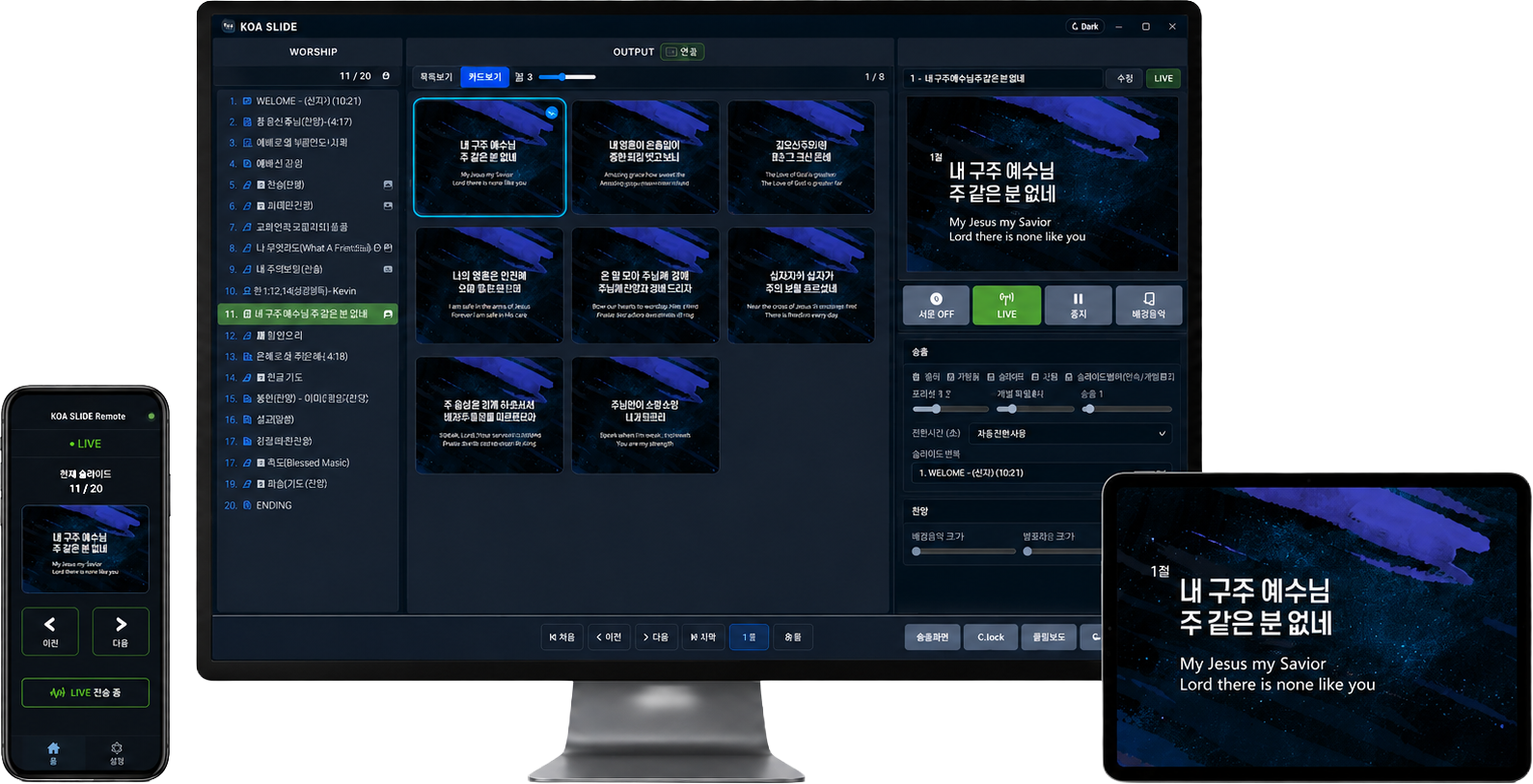
KOA SLIDE (KOASLIDE / 코아슬라이드) is free worship subtitle software for small and immigrant churches — prepare lyrics, Scripture, and media, then present with confidence.

  • Windows
  • macOS
  • Korean · English
  • Completely free
KOA SLIDE · EDIT MODE READY
01
Easy prep

Lyrics · Scripture · media in one place

02
Preview first

Check the next slide before you go live

03
Stable present

Fast control during the service

04
Preach & advance

Clicker or phone while you preach

EDIT MODE PREPARE

Prepare everything
on one screen

  • Lyrics · Scripture · media · canvas together
  • Easy Korean & English lyric editing
  • Build the order of service and preview

During the service,
focus on leading

  • See the current slide and what’s next at a glance
  • Light mode · Dark mode
  • Lyric-focused · card-focused slides
  • Edit lyrics live while presenting
SHOW MODE LIVE
CANVAS DESIGN DESIGN

Design titles & notices
yourself

  • 16:9 canvas built for worship
  • Text · shapes · image layers
  • Flexible design for your church context

Control from a clicker
or your phone

  • Advance slides with a clicker
  • Phone remote from your seat
  • View the output on phones & tablets on the same network
  • Singers and preachers can follow the current lyrics
Remote control and output monitor

Built for
bilingual worship

  • KR/EN ready KOA SLIDE supports Korean and English throughout
  • Choose your Bible Jump into multiple language Bible databases
  • Local data Edit & present offline (remote needs the network only)
LIVE OUTPUT 16:9
KOA SLIDE bilingual output screen

Start free today

Every core feature is free — no ads. v0.9.3

If you already use KOA SLIDE, the app can notify you about updates. View v0.9.3 changelog

FOR WINDOWS

Download for Windows

Download

Windows install tip (unsigned)

  1. Run the downloaded Setup file.
  2. If you see “Windows protected your PC”, click More info.
  3. Click Run anyway to continue the install.
FOR MACOS

Download for Mac

Download

Mac install tip (unsigned)

  1. Drag the DMG app into Applications.
  2. Run this command in Terminal: xattr -cr "/Applications/KOA Slide.app"

  3. Open the app from Applications again.

Supporters

Thank you for your support.

Base gift Special gift Monthly gift
  • 이슬이
  • 양정금
  • 박주한
  • 유정식
  • 유대희
  • Won H. Park
  • 스마이
  • Waiting for the next name

Frequently asked questions

Do I need the internet?+

Editing and presenting run on local data on the church PC. Only the phone remote needs the same network.

Can I show Korean and English at the same time?+

Yes. You can display lyrics and Scripture in Korean and English together, and turn English on or off.

Can I import existing lyrics and Bible data?+

You can use Bethlehem Bible data, EasySlides-format song libraries, and various Korean–English translations.

Is there a Mac version?+

Yes. Both Windows and macOS builds are available on this page.

Is it free even if I don’t donate?+

Yes. Giving is voluntary and unrelated to using the software.

Where can I send feedback or reviews?+

Please leave a note on the feedback board at the bottom of the page. After signing up, feature requests, pain points, and how your church uses KOA SLIDE are all welcome.

Share feedback
and reviews

After signing up, leave a note on the board — we reply personally. Feature ideas, pain points, and reviews are all welcome.

Feedback board